- Featured Product: Online Payments (Stripe)
- Meet Moveware
- Getting Started
- Jobs
- The Job Life Cycle and Statuses
- Jobs – Search
- Jobs – Details
- Jobs – DSP
- Jobs – Diary
- Jobs – Contact
- Jobs – Costing
- Jobs – Costing Interface
- The Costing Life Cycle
- Add a Cost Option
- Add Estimated Costs and Suppliers in Costing
- Add a Sell Price in Costing
- Add a Cost Line to a Cost Option
- Print a Quote for a Cost Option
- The Status Q Cost Option
- Modify the Cost Option Details
- The Option Total Line
- Add Actual Costs and Post a Purchase
- Accruals in Job Costing
- Multiple Currencies in Jobs Costing
- Enter Foreign Currency Costs and Sell Prices
- Add an Additional Cost Option
- Combine Cost Options
- Misc Job Types Costing
- Cancel a Cost Option
- Change a Cost Option Customer (Debtor)
- Change a Supplier (Creditor) of a Costing Line
- Set a Costing Line as No Charge
- Set a Cost Option as No Charge
- Create a Costing Credit Note
- Internal Resource Costs
- Jobs – Costing Fields
- Jobs – Invoicing
- Jobs – Invoicing Interface
- Create an Invoice in Jobs
- Modify Invoice Header Information
- Modify Invoice Charge Lines
- Invoice One Total Line
- Post an Invoice in Jobs
- Print an Invoice in Jobs
- Unlink an Invoice from a Cost Option
- Add a Credit Note
- Add an Additional Invoice
- Partial Invoicing
- Jobs – Invoicing Fields
- Jobs – Inventory
- Jobs – Resources
- Jobs – Import / Export
- Jobs – Waybill
- Jobs – Storage
- Jobs – Review
- Jobs – Claims
- Job Folder
- Baggage
- Fine Art
- Corporate (CRM)
- Sales
- Daily Diary (Operations Diary)
- Operations Diary Icons and Filters
- Operations Diary Notes
- Allocate Resources in the Operations Diary
- Close a Day from the Operations Diary
- Confirm Start Times
- Diary Actions in the Operations Diary
- Print the Operations Diary
- SMS Messages in the Operations Diary
- Enter Actual Times in the Operations Diary
- Operations Diary – Planner Tab
- Organizer
- Waybills
- Operations
- Full Screen Dispatch
- Container Movements
- Crates
- Destination Summary
- Fleet
- Inventory Management
- Labels
- Asset Management
- Object Management
- Resource Usage
- Start Times
- Timesheets
- Workload
- Diary Messages
- International
- Quality
- Storage
- Storage Management
- Storage Invoicing
- Storage Rate Revision
- Storage Locations
- Warehouse Management
- Customers
- Customer Management
- Customer Ageing
- Combined Invoicing
- Customer Approval Setup
- Invoicing
- Invoice Update
- Receipting
- Receipt Listing
- Receipts Import
- Van Line Clearing
- Suppliers
- Supplier Management
- Purchases
- Create a Manual Purchase Invoice
- Apply a Purchase Invoice to a Job
- Apply a Purchase Invoice to a Waybill
- Apply a Purchase Invoice to an Inventory
- Assign a Purchase Invoice for Approval
- Cancel a Purchase Invoice
- Email a Purchase Invoice
- Purchase Invoicing in Foreign Currency
- Modify a Purchase Invoice
- Place a Purchase Invoice on Hold
- Print a Purchase Invoice
- Reverse a Posted Purchase Invoice
- Search for a Purchase Invoice
- Purchase Event Log
- Purchase Approval
- Purchase Update
- Purchase Import / Export
- Accruals Management
- Payments
- Payment Batch
- Payment Listing
- Purchase Orders
- Contra Accounts
- Subcontractor Payments
- General Ledger
- Chart of Accounts
- General Ledger Setup
- General Ledger Inquiry
- General Ledger Journals
- General Ledger Accounting Close Date
- Budgets
- Sales Budgets
- Tax Return Module
- Banking
- Employees
- Employee Management
- Employee Payroll
- Employee Payroll Update
- Employee Payroll Admin
- Single Touch Payroll
- STP Phase 2 – Quick Start Guide
- STP Phase 2 – FAQ
- Moveware STP Configuration
- STP Workflow
- STP Reporting
- STP Corrections
- STP Data Export Fields and Requirements
- Administration
- Moveware Setup
- Bank Accounts
- Branch Management
- Calendar Management
- Codes Management
- Company Management
- Cost Centres
- Destinations
- Diary Actions
- Diary Messages
- Internal Phone Book
- Inventory Management
- Inventory Management – Containers
- Inventory Management – Crates
- Inventory Management – Furniture
- Inventory Management – Labour
- Inventory Management – Office Equipment
- Inventory Management – Other
- Inventory Management – Packing Materials
- Inventory Management – Storage
- Inventory Management – Vehicles
- Inventory Management – Vessels
- Job Products
- Job Types Management
- Locations
- News and Information
- Paragraph Management
- Ports Management
- Postcodes
- Rates Management
- Review Setup
- Sales Representatives
- Supplier Products
- Tax Codes
- Waybill Payment Messages
- Web Setup
- System Setup
- Codes
- Error Log
- Event Log
- Groups
- Menu Management
- MoveConnect
- MoveConnect Log Viewer
- Remote Printers
- Report Configuration
- Security Management
- System Settings
- System Start Numbers
- System Parameters
- User Management
- Mobi Setup
- Keeping Mobi Updated
- Set Up Employees to Use Mobi
- Configure Mobi Settings
- All Mobi Settings
- Language Setup
- Configure Pre-Set Paragraphs
- How to Customize Menus, Reports, and Reviews in Mobi
- Editing Inventory Item Button Ribbon
- Customize Mobi Inventory Buttons
- Defaulting Methods in Mobi
- Mobi Barcoding
- Configuring Mobi Costing Menu
- Send E-mails from Mobi
- How to Activate Mobi Automatic E-mail/SMS
- Set up a Feedback Form
- Exporting Data Out of Mobi
- Utilities
- Reports
- Generate Reports
- Set a Custom Report
- Print Reports
- Schedule Reports
- Configure Reports
- Reports – Favourites
- Reports – Sales
- Reports – Export
- Reports – Import
- Reports – Operations
- Reports – Storage
- Reports – CRM (Corporate)
- Reports – Customers
- Reports – Suppliers
- Reports – General Ledger
- Reports – Employees
- Reports – Analysis
- Reports – Other
- Reports – Schedule
- Moveware Applications
- MobiCrew
- Download and Log Into Mobi (MobiCrew)
- Sync Information in Mobi
- Mobi Interface and Menus
- Mobi Jobs
- Search Screen
- Summary Screen
- Notes Screen
- Addresses Screen
- Diary Screen
- Messages Screen
- Status Screen
- Inventory Screen
- Mobi Vehicle Receipting and Condition Reporting
- Materials Screen
- Manage Materials
- Costing Screen
- Client Signoff
- Reviews Screen
- Print Screen
- Check Off Screen
- Timesheet
- Download Screen
- Vehicle Documents
- Mobi Warehouse
- Mobi Fine Art
- Mobi Submit Feedback Menu
- MobiSurvey
- Online Payments
- MoveSurvey
- MoveSurvey Setup
- Install MoveSurvey
- MoveSurvey Wizard
- MoveSurvey – Import Onto Another Device
- Moveware Codes for MoveSurvey
- Set up MoveSurvey Users
- Set up Job Products for MoveSurvey
- Set up Inventory for MoveSurvey
- Moveware reports in MoveSurvey
- Run MoveSurvey
- Enabling the Camera Permissions in MoveSurvey
- Uninstall MoveSurvey
- Using MoveSurvey
- MoveSurvey Main Menu
- Synchronise Data in MoveSurvey
- MoveSurvey – Search
- MoveSurvey – Details
- MoveSurvey – Notes
- MoveSurvey – Diary
- MoveSurvey – Inventory
- MoveSurvey – Review
- MoveSurvey – Resources
- MoveSurvey – Account
- MoveSurvey – Client Summary
- MoveSurvey – Reports
- MoveSurvey – Tools
- MoveSurvey Photos & Attachments
- MoveCrew
- MoveCrew Setup
- Using MoveCrew
- MoveSMS
- MoveTransfer
- Portal
- Web Portal – Moveware Admin Guide
- Web Portal – Move Manager Guide
- Web Portal – Client Guide
- Web Portal – Online Quote
- Web Portal – Partner Guide
- Third Party Interfaces
- 1-Stop
- A3
- ABF
- Adobe Sign
- ADP Payroll
- Allied Van Lines Canada
- Altair
- ANZ
- Ariba
- Australian ABA File
- Bambora
- Bank of NZ
- Bekins Van Lines
- Canadian Banking Files
- Cargowise
- Compare Quotes
- Credit Cards
- CustomsController
- Daycos
- Dimensions (Access)
- Dynamics Business Central
- Dynamics Navision
- EasyDPS
- eMyLeads
- Enterprise
- Exactus
- Exact
- Ezidebit
- FMS
- Fuel Card Interfaces
- Great Plains
- Happy to Serve
- Harmony
- Hockingstuart
- IBS
- ISF Integration
- LogiX
- Make Tax Digital
- Manpack3
- Maximizer
- Moving24
- MSP
- MVF / MoveHub
- MyDHL+
- NAB Transact
- NEDVAN
- NES (National Export System)
- New Zealand Banking File
- New Zealand Defence Force
- New Zealand Ministry of Education
- New Zealand Police
- OFAC
- Orphee (Groupage)
- Parsifal PRISM
- Pasha
- Podium
- Quickbooks
- RHA
- Royal Mail PAF
- Royal Wolf
- Sage
- SAP
- SAP Ariba
- SCF
- SEPA File
- South African Banking Files
- SuperStream
- Techmate
- Trackfreight
- TriGlobal
- Twilio
- UK BACS File
- U.S. Bank – Multi Payment Export
- U.S. NACHA File
- Visma Global
- Weichert
- Westpac NZ
- Westpac (PayWay)
- Worldpay
- World Office
- Wheatons Van Lines
- Xero
- Moveware Hosting Platform
- Infrastructure Setup
- Moveware Infrastructure Setup
- Product Requirements
- Recommended Settings for Windows Desktop Resolution
- General Settings
- Install Moveware Client on Terminal Server or Workstation
- Install Crystal Reports Runtime Files (Manually)
- Install Moveware PDF (Manually)
- Moveware Database Setup
- Database Client Tools
- Disaster Recovery
- Moveware System Security
- Moveware System Backup
- Moveware System Restore
- Ransomware
- Set up a Microsoft Scheduled Task
- Set up a Moveware Database and Backup Procedure on a Client’s Server
- Windows Update Settings
- Windows Virus & Ransomware Protection
- Glossary
- Help and Support
The Groups window, located in Administration > System Setup > Groups, allows you to manage individual user group settings and security for Mobi.
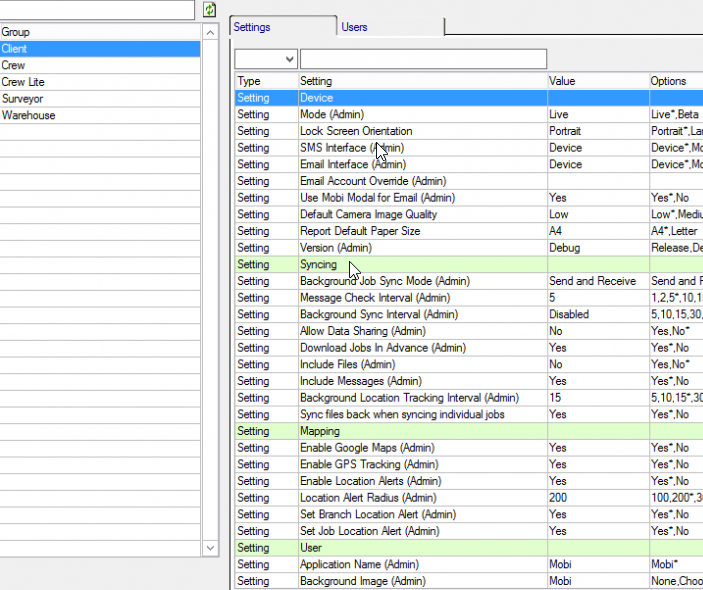
From this window, you can assign permissions to a group as a whole. You can also view and add users to a user group in the Users tab. From that tab, click the Add button and choose from the list of Users.